
Updates
What's New
The latest features, improvements, and fixes shipped to SetFlow
v2.13.0NewImprovedFixed
Serato DJ Support, Sidebar Redesign & Cleaner Confirms
Serato DJ Pro is now a first-class library source in SetFlow. Import your _Serato_ folder, generate harmonic sets, and export back as native .crate files. Plus a redesigned Library sidebar and a much cleaner Clear Library flow.
New
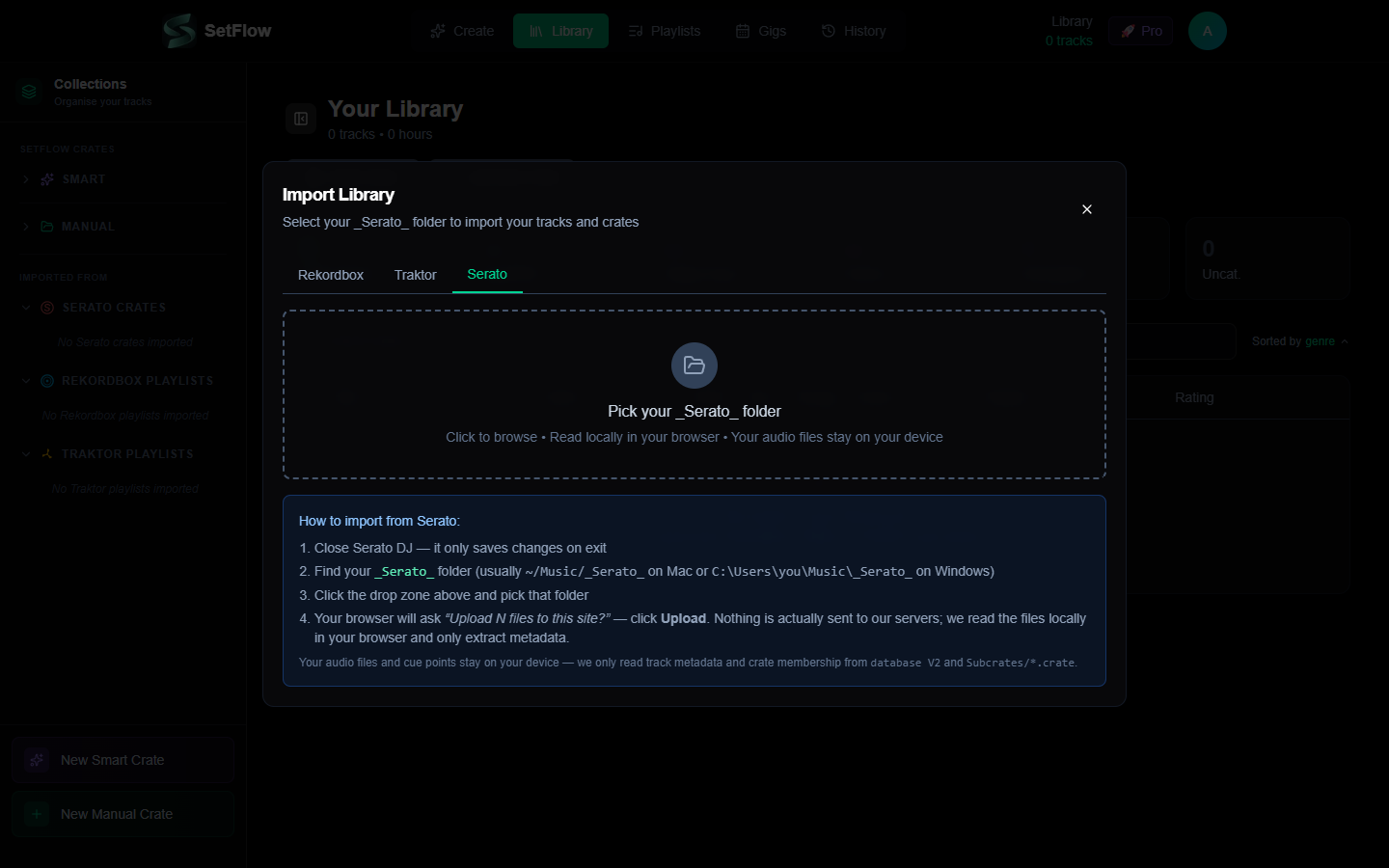
- •Serato library import — point at your
_Serato_folder and we read the binarydatabase V2plus everySubcrates/*.crateautomatically. Full BPM, key (Open Key → Camelot), genre, rating, and crate metadata imports just like Rekordbox and Traktor. - •Serato crate export — new Serato Crate button in every export panel produces a binary
.cratefile. Drop it into_Serato_/Subcrates/, reopen Serato, the crate appears with all tracks linked. - •Folder upload UX — Serato's library is folder-based (not a single file). The import modal's Serato tab uses a folder picker with explicit messaging that nothing is uploaded to our servers — we read everything locally in your browser.
- •Crate hierarchy — Serato's
%%nested-folder convention is parsed correctly (e.g.House%%Deep.crate→ folder path House / Deep).
Improved
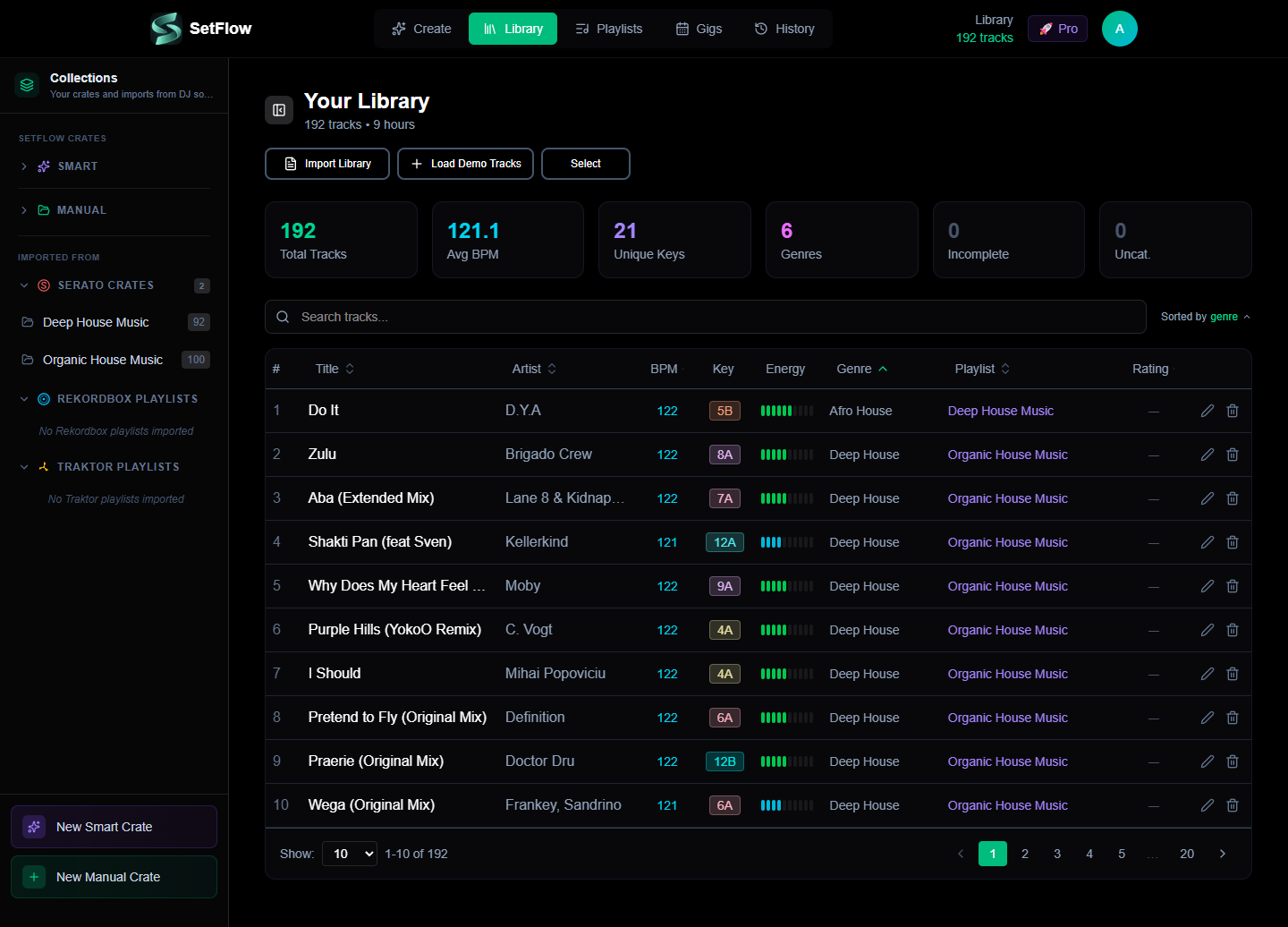
- •Library sidebar restructured — renamed to Collections with two clear groups: SetFlow Crates (your Smart and Manual crates) and Imported From (Serato Crates, Rekordbox Playlists, Traktor Playlists). All three import sections are always visible so you know where each DJ software's content will land.
- •Smart expand/collapse — empty sections collapse, sections with 1–5 items expand, large sections collapse to avoid scroll walls. Your manual choices persist across reloads via local storage.
- •“Import All” now creates playlists / crates — previously this only persisted the flat track list. Now all discovered playlists and crates come with it, regardless of which DJ software you import from.
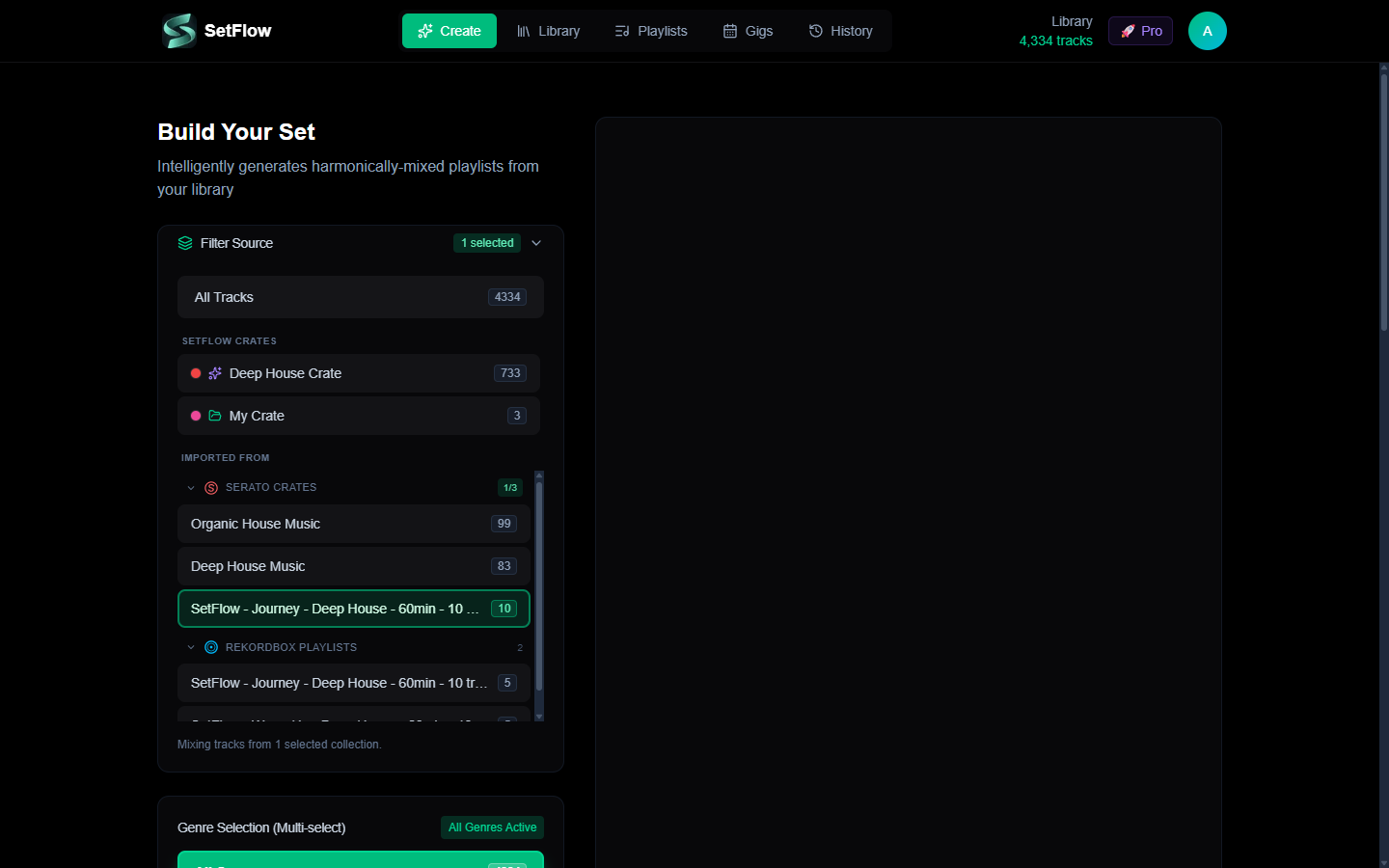
- •Unified Filter Source on the Create page — the old stacked Filter by Playlist and Filter by Crate cards are replaced by one grouped picker mirroring the Library sidebar (SetFlow Crates / Imported From). Sub-groups for Serato, Rekordbox and Traktor are individually collapsible with smart defaults and localStorage persistence. Per-source
1/3badges make selection state scannable without expanding. - •Confirm dialogs redesigned — the “Are you sure?” modal now supports structured bullets, info notes, and warning callouts with appropriate icons. Replaces walls of paragraph text with scannable visual hierarchy.
Fixed
- •Clear Library now wipes imported playlists too — previously this only deleted track rows, leaving stale 0-track playlist headers in the sidebar. Now both are cleared in one action. SetFlow Smart and Manual crates are explicitly preserved — those are user-created organisation, not imported data.
- •Playlist source preserved on import — the
POST /api/playlistshandler had a stale ternary that silently relabelled any non-recognised source torekordbox. Serato crates now correctly persist assource: serato. Regression test added to prevent recurrence.
Read the full walkthrough including the round-trip workflow and the format-internals story in the companion blog post.
v2.15.0NewImprovedFixed
Large Library Performance & Import Fixes
- •30K+ track library support — fixed an import validation issue that blocked large Traktor and Rekordbox collections with multi-genre tags (e.g. “Downtempo, Ambient, Chillout, Electro”). Genre limit raised from 50 to 200 characters
- •Set generation Web Worker — set generation now runs off the main thread, so the UI stays fully responsive while your set is being built. No more screen freezes on large libraries
- •10x faster library loading — tracks now load in parallel batches instead of sequential requests. A 30,000-track library loads in under a second, down from 6–10 seconds
- •Clean BPM display — BPM values from Traktor (e.g. 127.999252) are now rounded to whole numbers across the entire app. Existing tracks update on re-import
- •Longer file path support — file path validation limit raised from 500 to 1,000 characters to support deeply nested folder structures and URL-encoded Rekordbox paths
v2.14.1Fixed
iOS Safari & Mobile Modal Fixes
- •iOS Safari auto-zoom fix — tapping inputs no longer causes the page to zoom in on iPhone. All form elements use the correct font size on mobile screens
- •Dynamic viewport height for modals — modals now use
dvhinstead ofvh, properly accounting for Safari's address bar, status bar, and home indicator - •Gig form mobile spacing — tighter padding, reduced textarea rows, and better grid gaps so the gig editor fits comfortably on small screens without horizontal overflow
- •Link set modal viewport fit — search input, sort controls, and pagination no longer overflow on narrow screens
v2.14.0NewImproved
Free Trial Export & Annual Pricing
- •1 free export for trial users — trial users can now export one set in any format (M3U8, Rekordbox XML, PDF, TribeXR) before upgrading. Experience the full export workflow during your trial
- •50% off annual billing — annual plans now save 50%. Hobby from £1.49/mo, Pro from £2.49/mo
- •Social share buttons — share your public sets directly to X, Facebook, WhatsApp, and more from the public set page
- •Mobile layout improvements — improved spacing and layout on history and gigs pages for mobile devices
v2.13.0NewImproved
Track Metadata Editing & Quality of Life
- •Track metadata editing — edit BPM, key, energy, genre, rating, and tags directly from your library. Changes persist and feed into the set generation algorithm for better results
- •Compact edit modal — redesigned for mobile with BPM + Key and Genre + Rating side-by-side, a 1–10 energy bar, and a tag system — all visible without scrolling
- •Install as app (PWA) — SetFlow can now be installed as a standalone app on your phone or desktop via your browser's “Add to Home Screen” or install prompt
- •Email unsubscribe — all marketing emails now include a one-click unsubscribe link. You'll still receive important account emails (password resets, billing)
- •Admin metrics optimisation — admin dashboard metrics now load significantly faster via SQL aggregation
v2.12.0Improved
Mobile Import Experience
- •Mobile-friendly import modal — the import library modal now works seamlessly on phones and small screens with responsive layouts, scrollable content, and touch-friendly controls
- •Card-based track list — on mobile, tracks display as compact cards instead of a table, showing title, artist, BPM, and key at a glance
- •Stacked controls — buttons, filters, and action bars stack vertically on small screens so nothing gets cut off or requires horizontal scrolling
v2.11.0New
Traktor DJ Support
- •Traktor NML import — import your Traktor Pro collection directly into SetFlow. The new Traktor tab in the import modal parses your NML file with full BPM, key, genre, and energy metadata
- •Traktor key conversion — Traktor's MUSICAL_KEY values and Open Key notation are automatically converted to Camelot notation for harmonic mixing compatibility
- •Playlist resolution — Traktor playlists and folder hierarchies are fully supported. Select which playlists to import, or import your entire collection at once
- •M3U export for Traktor — new M3U download option on generated sets (Create page, History page, and expanded set view) for Traktor-compatible playlist export
- •Unified import experience — the import modal now features Rekordbox and Traktor tabs with platform-specific instructions, file validation, and export guides
v2.10.0New
TribeXR VR DJ Support
- •TribeXR export — one-click export to TribeXR VR DJ from the Create page and History page. A guided 3-step modal walks you through platform selection (Quest, PC VR, Dropbox), set review, and download with platform-specific file paths
- •Public set TribeXR section — shared set pages now include a collapsible “Use with TribeXR” section where anyone can download the
rekordbox.xmland see platform-specific setup instructions — no account needed - •Duration quick presets — new 30m, 45m, 60m, and 90m buttons above the duration slider on the Create page for faster set configuration, especially useful for VR session planning
- •TribeXR FAQ category — 4 new questions added to the Help Center under a dedicated “TribeXR & VR DJing” category, covering workflow, platform support, harmonic mixing, and VR DJ app compatibility
- •Energy-to-colour mapping — exported tracks include Rekordbox colour codes derived from energy levels, providing visual energy indicators when loaded in TribeXR
v2.9.0NewImproved
Help Center
- •Help Center — the FAQ page has been completely redesigned into a proper help portal at /help with three tabs: Getting Started, FAQ, and Contact Support
- •Getting Started guide — step-by-step walkthrough from importing your Rekordbox library to generating and exporting your first set, with pro tips and links to relevant blog articles at each step
- •Contact Support — reach us directly from the Help Center. Pick a subject, describe your issue, and we'll get back to you within 24 hours. Pre-fills your name and email if you're signed in
- •Tidied FAQ — trimmed from 42 to 28 focused questions, merged Algorithm and Harmonic Mixing into a single “How It Works” section, and organised everything under clear category headings with counts
- •Blog links throughout — relevant blog articles are linked from both the Getting Started steps and 14 FAQ answers, making it easy to dive deeper into topics like harmonic mixing, energy flow, and Rekordbox tagging
v2.8.0New
Shareable Set Links
- •Shareable set links — generate a public link for any set and share it with other DJs, promoters, or on social media. Anyone with the link can view your tracklist, transitions, and energy flow
- •Public set viewer — beautiful standalone page at setflow.app/s/… showing your set with BPM, Camelot keys, energy bars, transition notes, and an energy flow visualisation
- •One-click share from History — new share button on every set card. Click to generate a link, click again to copy or remove it. Shared sets show a green indicator so you always know which sets are public
- •Social media previews — shared links include Open Graph metadata with your set name, genre, track count, and energy profile so they look great when pasted into WhatsApp, Discord, Twitter, or Instagram DMs
- •Privacy controls — only you can share or unshare your sets. Public pages never expose your account or internal data. Remove a share link at any time to make the set private again
NewImproved
Milestones, Monthly Reports & Smarter Emails
- •Set milestones — hit 10, 50, or 100 generated sets and we'll celebrate with you. Each milestone email includes your stats and what you've achieved
- •Monthly usage reports — Hobby subscribers get a monthly summary of sets generated, top genres, and how you're using SetFlow
- •Hobby monthly reset — your 10 sets/month allowance now resets automatically on the 1st. No more manual intervention needed
- •Helpful getting-started emails — new subscribers receive tips on days 3, 7, and 14 covering library organisation, energy profiles, and advanced features to get the most out of SetFlow
v2.7.0NewImproved
Bigger Trial, Better Onboarding
- •Bigger trial — import up to 500 tracks (was 100) and get 7 days (was 5) to generate 3 sets. More tracks means better harmonic matches and higher-quality results
- •In-app pricing page — compare Hobby and Pro plans side-by-side without leaving the app, with monthly and annual pricing toggle
- •New user onboarding — first-time users see a guided welcome on the Create page with a 3-step progress indicator: Import Tracks → Generate a Set → Export & Play
- •Smarter email notifications — payment failure alerts, cancellation confirmations with your data summary, and win-back emails so you never lose track of your library
v2.6.0NewImproved
Better Pricing & Your Voice Matters
- •Annual pricing option on the upgrade prompt — see monthly and annual side-by-side with a Save 33% badge, defaulting to the best-value annual plan
- •Quick feedback on the trial expired screen — tell us what's holding you back with one tap. Your feedback directly shapes what we build next
- •Cleaner upgrade experience — refreshed layout with clearer pricing breakdown showing per-month cost for both billing intervals
v2.5.0NewImproved
Gig Calendar — Smarter Set Linking
- •Redesigned set linking experience in the Gig Calendar — rich set cards showing energy profile badges, genre, BPM range, star ratings, and mini energy bar visualizations
- •Energy profile filter pills — quickly narrow sets by Journey, Peak, Warm Up, Chill, or Cool Down energy archetypes
- •Enhanced search — now searches across set name, genre, energy profile, and crate names
- •Sort controls — sort by newest, rating, duration, or track count with ascending/descending toggle
- •Handles large libraries — browse 100+ sets smoothly with paginated results
- •Crate source badges — see at a glance whether a set was built from a Manual Crate, Smart Crate, or Manual Build
v2.4.1New
Gig Calendar & Post-Gig Reviews
- •New Gig Calendar — schedule upcoming gigs with venue, location, time slot, set duration, and pre-gig notes
- •Dual view modes — switch between a chronological list view and an interactive monthly calendar with colour-coded dot indicators
- •Set linking — link one or more generated sets to each gig so you know exactly what you're playing
- •Post-gig reviews — mark gigs complete with crowd reaction and self-performance star ratings (1–5) plus post-gig notes
- •Time slot badges — categorise each gig as Warm Up, Peak Time, Closing, or Headline for quick reference
- •Monthly stats in the header — see upcoming gig count and completed gigs this month at a glance
v2.4.0NewImproved
My Playlists Hub
- •New My Playlists hub — browse, search, filter, and manage all your saved playlists in one place with stat cards and quality scores
- •Energy curve chart — see your target energy profile overlaid with actual track energies so you can spot where your set builds and drops
- •Visual quality bars — instantly see harmonic, BPM, and energy compatibility scores for every playlist at a glance
- •Smarter suggestions — filter suggested next tracks by energy profile to stay on target while building playlists manually
- •Manual Build badge — manually-built playlists now show an amber tag in Set History so you can easily tell them apart from algorithm-generated sets, plus a filter to show only manual builds
- •Smoother experience throughout — faster loading and a cleaner layout across the whole page
v2.3.0New
DJ Guides & Blog
- •Launched the SetFlow Blog — in-depth guides written for DJs, accessible from every page
- •First three articles: Complete Guide to Tagging Tracks in Rekordbox, Harmonic Mixing & the Camelot Wheel, and Understanding DJ Set Energy Flow — everything you need to get more out of your sets
ImprovedFixed
Settings Redesign & Import Fixes
- •Rebuilt the settings page into clean sections so you can find account, subscription, and preference settings faster
- •Fixed half/double-time BPM matching — tracks at 128 BPM now correctly pair with tracks at 64 and 256 BPM for smoother transitions
- •Fixed an issue where some valid Rekordbox XML files were rejected during import — more library formats now work first time
v2.2.0Improved
Homepage Redesign
- •Brand new homepage with a bold new look that better shows what SetFlow can do for your DJ sets
- •Interactive screenshot carousel — see the Set Builder, Library, Playlists, and more in action before you sign up
- •DJ community highlights, testimonials, and a quick FAQ so you can get answers without leaving the page
- •Redesigned pricing section with annual/monthly toggle and side-by-side feature comparison to help you pick the right plan
- •Looks great on every device — fully responsive across mobile, tablet, and desktop
v2.1.0NewImproved
Google Sign-In, Smart Crates & Annual Billing
- •Added Google OAuth sign-in with automatic account linking for existing email accounts
- •Launched Smart Crates (Pro) — dynamic collections that auto-populate based on genre, BPM, energy, key, and rating filters
- •Manual crates now available on all tiers for hand-picked track collections
- •Introduced annual billing with 33% savings across Hobby and Pro plans
v2.0.0NewImproved
Set Planning Canvas & PDF Export
- •Launched Set Planning Canvas (Pro) — design custom energy curves with 2–6 named sections
- •Added PDF tracklist export with transition scores, key info, and energy levels
- •New BPM strictness control with percentage-based thresholds from ±2% to ±12%
NewImprovedFixed
Transition Tooltips & Clearer Upgrades
- •Added transition tooltips — hover over any transition to see score breakdowns and mixing technique suggestions to help you nail the mix
- •Clearer feature availability — Pro and Hobby features now show helpful descriptions of what you'll unlock when you upgrade, instead of just a lock icon
- •Fixed BPM warning badge overlapping other elements in the set view
Ready to build better sets?
Import your Rekordbox, Traktor, or Serato library and generate perfectly mixed DJ sets in seconds.
Try SetFlow Free